Keep the thread.
Decisions, preferences and project context remain available across conversations and devices. Return to the work without rebuilding the story each time.
 KINESIS LABAI-native product company
EXECUTIVE DIGITAL TWIN // AI PARTNER
Atlas is Kinesis Lab’s tailored Executive Digital Twin: an AI partner that connects persistent memory, task follow-through and approved execution. Think clearly, stay prepared and get approved work done across professional life, personal life, or both.
Your day doesn’t happen in one app. Your AI partner shouldn’t lose the thread every time you move between them.
Atlas connects an evolving record of your priorities, knowledge and commitments with the tools to research, plan, create and execute. It helps you remember why a decision was made and recognise what still needs attention.
“Executive digital twin” means continuity of context, not a replica of your judgment. You remain the decision-maker.
Commercial AI models provide reasoning and generation. Atlas connects that intelligence to your context, commitments and tools inside a system designed around you.
A powerful answer is useful. A partner that remembers the context, carries work forward and leaves you in control is a different proposition.
Decisions, preferences and project context remain available across conversations and devices. Return to the work without rebuilding the story each time.
Agreed work has an owner, a next step and a visible outcome. Configured schedules and task continuations can move work forward between conversations, not just while you are typing.
A durable, source-linked knowledge layer holds relevant notes and decisions outside a single chat. Review it, correct it and retain it as your context evolves.
Define where records live, which models receive information and which tools can act. Choose client-controlled hosting and local-model options where the agreed workload supports them.
A client-controlled deployment puts your records, configuration and backups in your custody, with documented export and handover. Your working history need not depend on one chat account.
Connect thinking to calendar actions, correspondence, software, documents and supported bookings. Atlas works within agreed permissions and checks the result.
Memory, projects, tools and scheduled tasks may already be available. Their behaviour, retention, export options and availability depend on the product and plan.
Your knowledge, workflows, permissions and records form a persistent layer around the models. The implementation defines what you control, how it is backed up and how it can move.
Atlas can use commercial AI models; it is not a claim that those models lack memory or tools. The distinction is the integrated, client-specific system and its agreed ownership and operating model.
Own the context. Retain the work. Keep the ability to move. With client-held records and backups, losing access to one model provider need not mean losing your knowledge or starting from zero. A compatible replacement can be configured while retaining the surrounding records and workflows.
No honest system can promise “no one can ever block it.” External model, hosting and connected-service access can still be restricted. Local operation can reduce those dependencies, with capability and hardware trade-offs. Data custody, software licences, source access, exports and handover are made explicit in the deployment agreement; model replacement requires validation and is not automatic failover.
Choose where Atlas belongs. You decide which accounts to connect, what stays separate and what your partner may do.
Connect your professional and personal commitments in a coordinated view. Make plans around the whole day. not just the working hours.
A combined view does not mean sharing personal information with colleagues or business contacts.
Professional + personal · Your chosen connections
Connect calendars, correspondence, knowledge and projects. Prepare meetings, build deliverables and follow through on agreed work.
Coordinate appointments, personal projects, dining and sports or leisure plans through supported services.
Plan around the whole day while retaining separate accounts, permissions and audiences for personal and professional information.
With the relevant services connected and permissions in place, a conversation becomes a practical next step.
Create and update events, coordinate appointments, and organise work and personal plans around your priorities.
“Find a time for the review and prepare the invitation.”Turn a brief into code, develop applications and websites, test changes and prepare releases. Publishing follows your approval rules.
“Build a landing page for this new solution.”Produce and revise documents, reports, presentations, proposals and spreadsheets, using the context and materials you provide.
“Turn these findings into a board presentation.”Find restaurants, make reservations, and arrange bookings or tickets for sports and leisure events through supported services.
“Find dinner options near the stadium and arrange the booking.”Draft and, where sending is enabled, send replies to messages and emails in the tone and scope you approve.
“Prepare a reply with the next steps we agreed.”Execute agreed workflows, check specified dependencies and track progress. Report the outcome or the exact blocker.
“When the review arrives, continue the approved changes.”Capabilities depend on the integrations and access agreed for your deployment. Actions requiring approval are presented with their exact details before execution. A draft is not a sent message; a booking request is not a confirmed reservation.
Conversation, knowledge and action share a workspace. Explore the rooms, not another growing list of disconnected chats.
A focused view of your priorities, recent developments and decisions needing attention. Briefings connect authorised calendar, correspondence and project sources.
Working web, iPhone and iPad interfaces, with text and voice interaction. Optional personal rooms organise financial records and wellbeing information for review, not autonomous financial or clinical decisions.
WEB / IPHONE / IPADSpeak naturally. Review the day. Follow the work. Different surfaces, the same connected context.
Captured from isolated demo variants using Atlas’s interface styles and Talk renderer. All content is synthetic. These are browser-rendered previews, not captures from a client account or a native iPhone session.
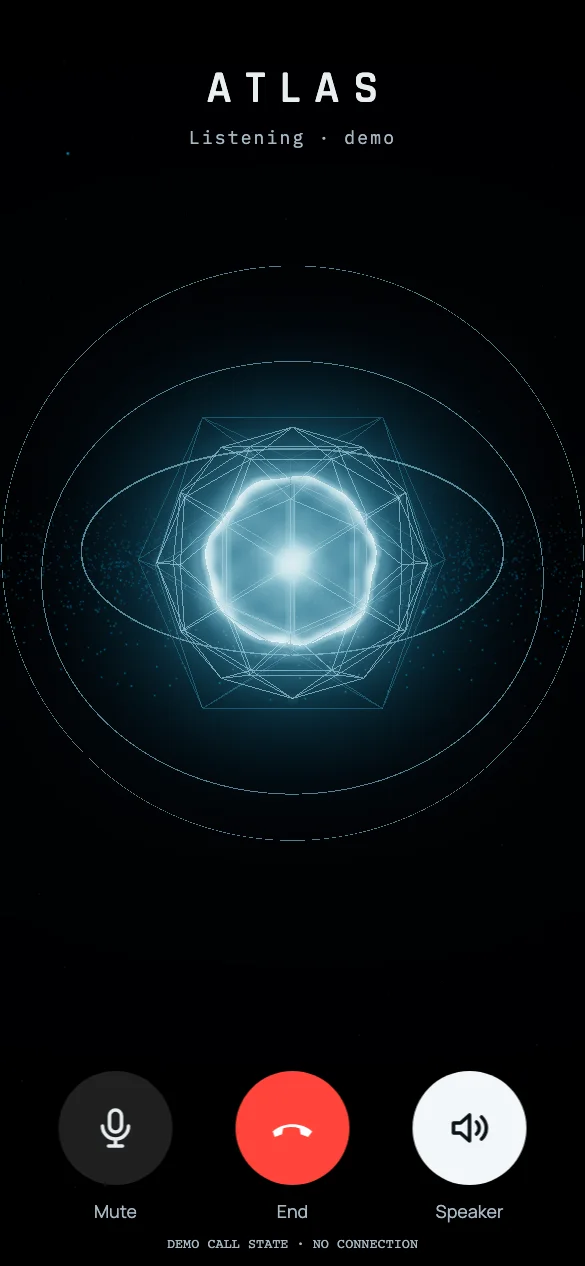
The Atlas core becomes the centre of a voice interaction. Shown in a simulated call state; no microphone or live connection was used.
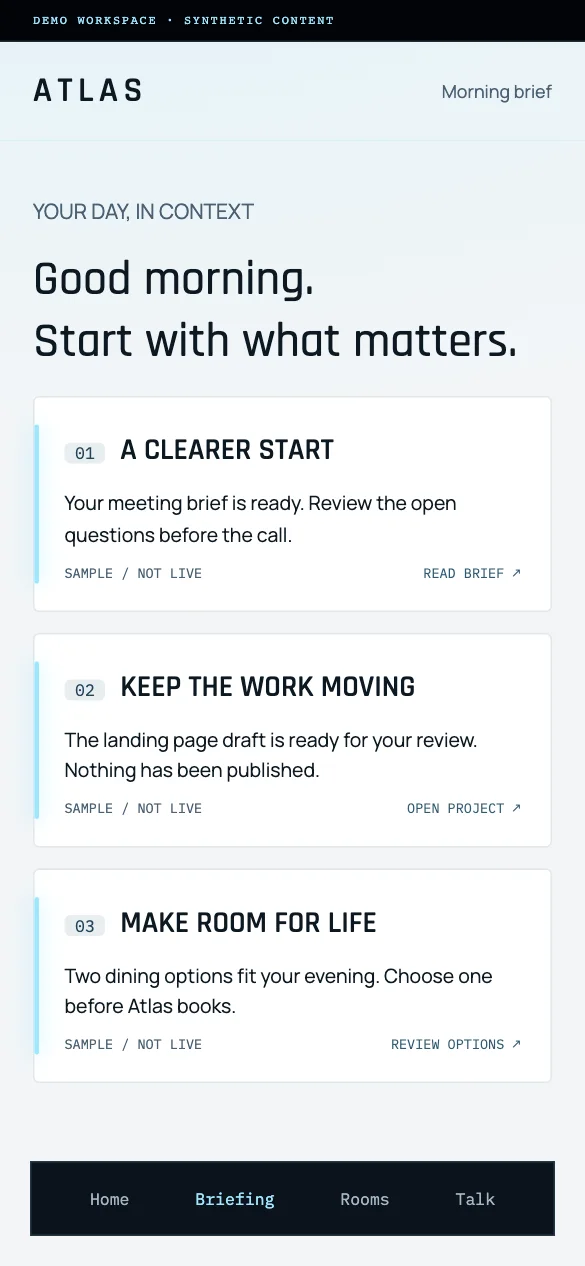
A focused view of what matters, what is progressing and what needs your decision. Sample content demonstrates the personal-and-professional option.
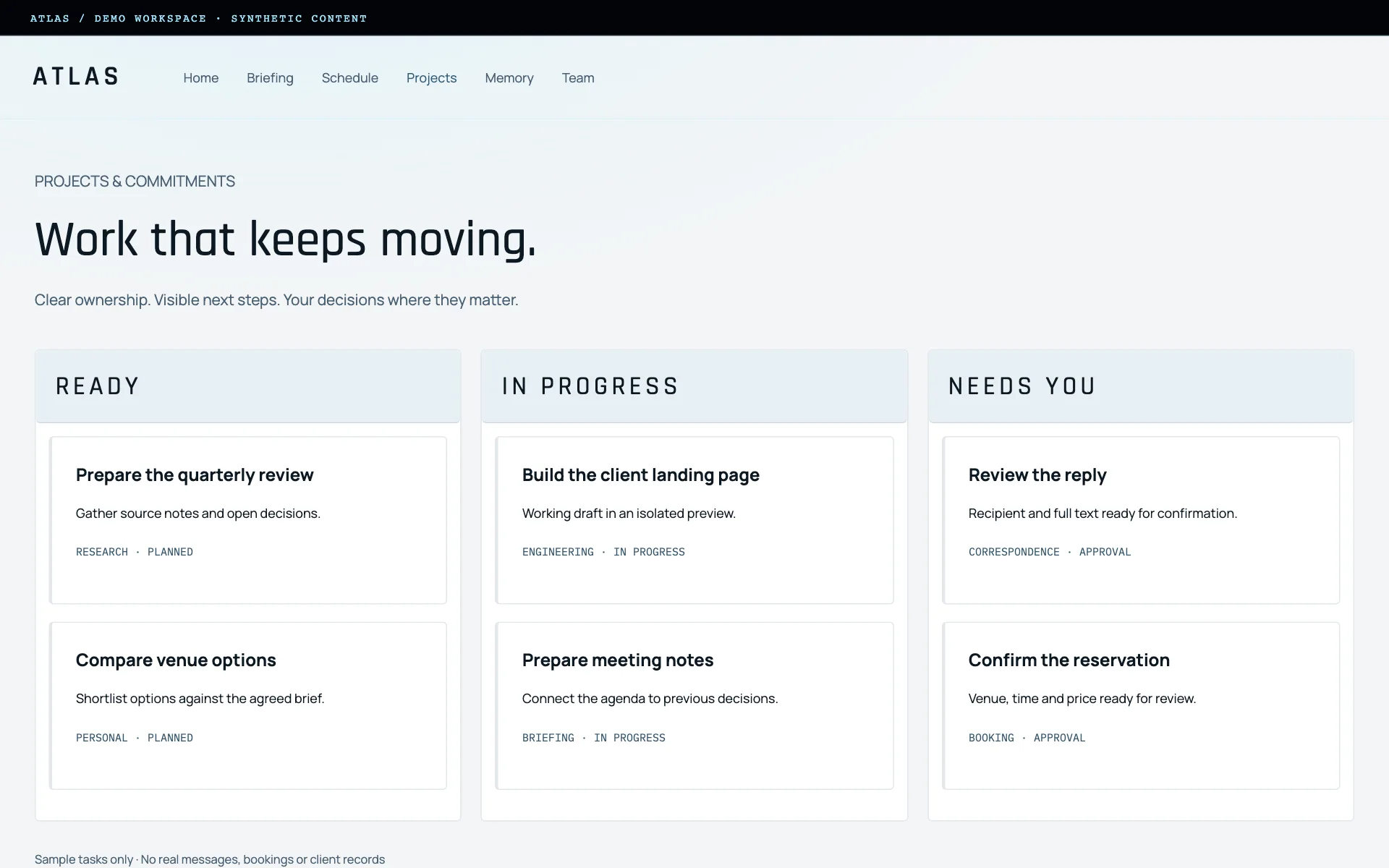
Work has a visible state, a next step and an approval boundary. This demo uses sample tasks, not private projects, real bookings or correspondence.
A useful relationship builds context. Atlas maintains a source-backed record of relevant preferences, knowledge and decisions, so you can return to the work without reconstructing its history.
Memory supports judgment. It does not replace evidence, and missing or uncertain information stays visible.
Research questions, compare options, develop drafts and challenge assumptions. Separate what is known from what is inferred.
Coordinate research, engineering and independent review where needed, with one accountable owner for the outcome.
Connect business indicators with project context to explain a change and propose the next useful action.
You define what Atlas may read, prepare and execute, and what needs your approval. Sensitive sends, bookings, spending, publishing and changes to live systems stay within those boundaries.
Actions and outcomes are recorded. Personal and business information are handled for their intended audiences. Hosting, AI providers, retention and access controls are agreed for each deployment.
Before an approval-required action, you see the concrete details, not a vague request for permission.
Atlas is our working reference environment. Each implementation builds on that experience, shaped around your workflows, not a promise to automate everything.
Map your working week, information sources, recurring decisions and approval boundaries.
Demonstrate a small set of useful workflows with approved data. Review working software.
Validate integrations, access, reliability and acceptance criteria before expanding responsibility.
Review outcomes and improve the system as your priorities and responsibilities change.
No. Choose professional life, personal life or both. Your choice determines the information sources, integrations, rooms and permissions included in the implementation.
Yes, within the services and permissions connected for your deployment. Tasks can include calendar updates, software and page development, document creation, correspondence and supported bookings. Required approvals come before execution, and Atlas checks the result.
Yes. The implementation defines separate accounts, access and audience boundaries. Choosing a coordinated view does not authorise disclosure of personal information to your business contacts.
Atlas is a tailored system around AI models: durable context, connected tools, tracked commitments and defined ownership. Commercial assistants can also offer memory and task features. Atlas’s distinction is how those capabilities are integrated into your environment, under the control and portability arrangements agreed for your deployment.
Client-held records and backups remain in your custody. A compatible provider or local model can be evaluated and configured without discarding that history. Service continuity is not guaranteed: replacement models, hosting and integrations have their own requirements, terms and capabilities.
This is a tailored solution. We scope the workflows, hosting, AI providers, integrations and operating arrangements with you, then demonstrate the agreed capabilities before expanding their role.
Start with the work you repeatedly have to chase, reconstruct or prepare. We’ll help define where Atlas can make a practical difference.
Discuss your AI partner ↗Opens your email app. Nothing is sent automatically.